# Marketler

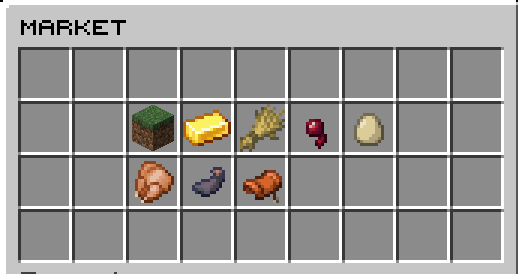
* Market sunucuda para kazanabileceğiniz en öncelikli yerdir.
* Sunucu tarafından belirlenen eşyaları satabilir ya da satın alabilirsiniz.
* <mark style="color:orange;">"/market"</mark> komutu ile market menüsünü açabilirsiniz.
* <mark style="color:orange;">"/market kategori ismi"</mark> ile direkt olarak ilgili kategoriyi açabilirsiniz.<br>

  <figure><img src="https://3041362293-files.gitbook.io/~/files/v0/b/gitbook-x-prod.appspot.com/o/spaces%2FZS3mOTiCWZpZZ4mzXgBD%2Fuploads%2FHtNd4LgElt6fQUfZw2Qo%2Fimage.png?alt=media&#x26;token=14f28abe-08a1-4ec1-8617-b5ae6a02f9da" alt=""><figcaption></figcaption></figure>
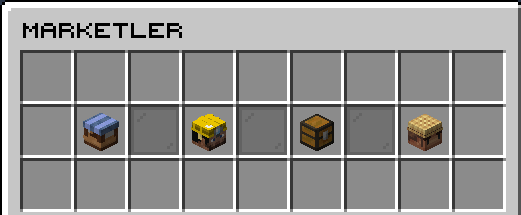
* Sunucu marketine ulaşabilmek için en üstteki <mark style="color:yellow;">market kısmından</mark> giriş yapabilirsiniz. <br>

  <figure><img src="https://3041362293-files.gitbook.io/~/files/v0/b/gitbook-x-prod.appspot.com/o/spaces%2FZS3mOTiCWZpZZ4mzXgBD%2Fuploads%2Frouc4dzSbR2bKw3ifXcN%2Fimage.png?alt=media&#x26;token=ba1ed182-274d-478b-a890-06fcc5e5a24a" alt=""><figcaption></figcaption></figure>
* Markette toplamda 8 adet menü bulunmaktadır.
* Bu menülerde olan eşyaları belirtilen miktar ve sayıda sunucuya satarak para kazanabilirsiniz.
* Ayrıca <mark style="color:yellow;">"/sat envanter"</mark> ile envanterinizde bulunan her şeyi satabilirsiniz.
* <mark style="color:yellow;">"/sat"</mark> komutu ile elinizdeki eşyayı satabilirsiniz.
* <mark style="color:yellow;">"/sat menü"</mark> ile bir menü açabilirsiniz ve bu menüye koyduklarınız otomatik olarak satılır.

---

# Agent Instructions: Querying This Documentation

If you need additional information that is not directly available in this page, you can query the documentation dynamically by asking a question.

Perform an HTTP GET request on the current page URL with the `ask` query parameter:

```
GET https://wiki.reborncraft.pw/reborncraft/reborn-skyblock/sistemler/marketler.md?ask=<question>
```

The question should be specific, self-contained, and written in natural language.
The response will contain a direct answer to the question and relevant excerpts and sources from the documentation.

Use this mechanism when the answer is not explicitly present in the current page, you need clarification or additional context, or you want to retrieve related documentation sections.